
#Spring Boot テスト実践入門
#このスライドについて
#対象者
Spring Boot を用いたアプリケーションのテストに自信が無い方
#目標
「テスト環境は整えたからテスト書いて」と言われたときに独力でテスト実装ができる知識を得る
#このスライドの対象外の話
- テスト環境の構築方法
- テスト設計
#題材とするエンドポイント
ユーザーの年齢を取得するエンドポイントに対してテストを作っていきます。
- テーブル「ユーザー情報」に「誕生日」が格納されている
- エンドポイントはユーザー ID を受け取り、そのユーザーの年齢を数値で返却する
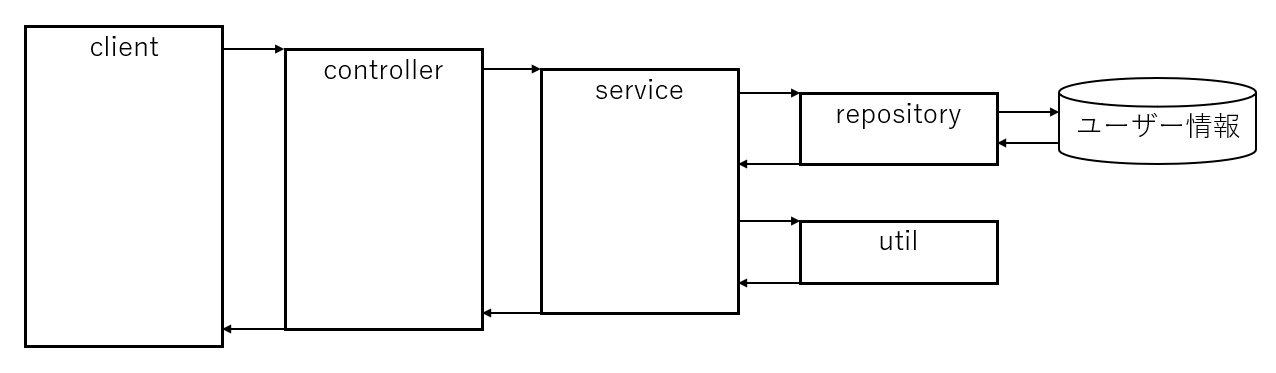
#テストを作る範囲
- Util のテスト(普通の Java のテスト)
- Service のテスト
- Repositoryのテスト
- Controller のテスト
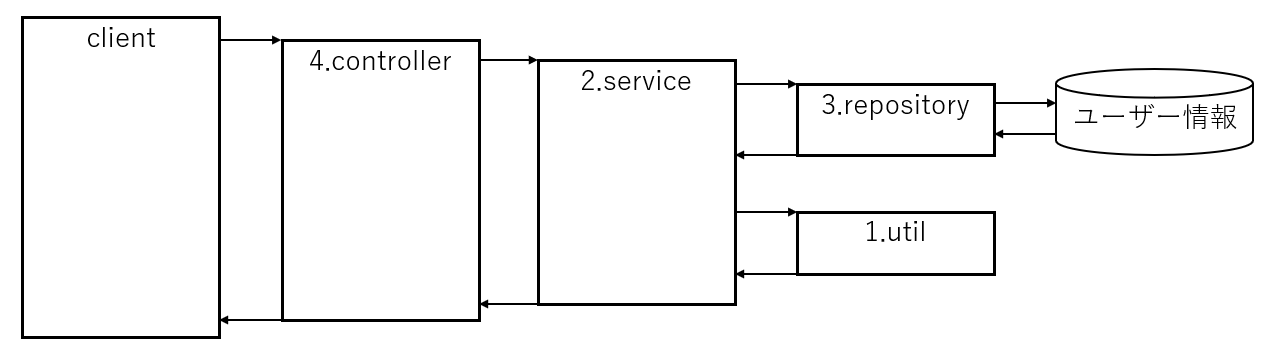
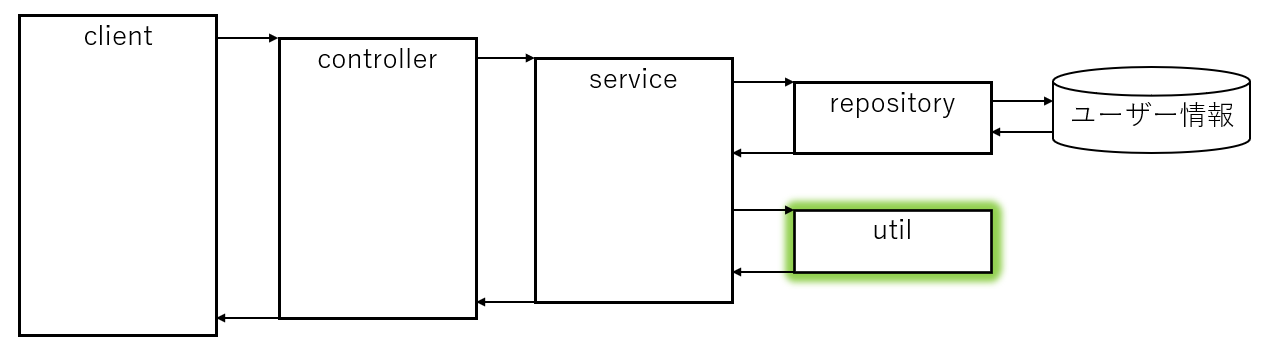
#Util のテスト(普通の Java のテスト)
入力に対して一意に出力が決まるメソッドのテスト。 Spring Boot 関係なく、ただの Java の単体テストと同じ考え方でOK。
#実装
package dev.mikoto2000.springboot.workshop.util;

import java.time.LocalDate;
import java.time.Period;

/**
 * ユーザーに関する諸々の処理を詰め込んだ Util クラス。
 *
 * 本来なら User クラスに含めるべき。
 */
public class UserUtil {

  /**
   * 年齢を取得する。
   *
   * 引数 targetDate で指定した日付に、誕生日 birthday の人が何歳であるかを返却する。
   *
   * @param birthday 誕生日
   * @param targetDate 計算の基準日
   */
  public static Integer getAge(LocalDate birthday, LocalDate targetDate) {
    if (birthday == null) {
      throw new IllegalArgumentException("birthday に値を設定してください");
    }

    if (targetDate == null) {
      throw new IllegalArgumentException("targetDate に値を設定してください");
    }

    return Period.between(birthday, targetDate).getYears();
  }
}#テスト
package dev.mikoto2000.springboot.workshop.util;

import static org.junit.jupiter.api.Assertions.*;

import java.time.LocalDate;
import org.junit.jupiter.api.Test;

/**
 * UserUtilTest
 */
public class UserUtilTest {
  @Test
  public void 誕生日ちょうど() {
    // テスト対象に渡す引数を準備
    LocalDate birthday = LocalDate.of(2000, 1, 1);
    LocalDate targetDate = LocalDate.of(2025, 1, 1);

    // 期待値(expect) と実際の値(actual)を求める
    Integer expect = 25;
    Integer actual = UserUtil.getAge(birthday, targetDate);

    // 期待する値と実際の値を比較
    assertEquals(expect, actual);
  }

  // TODO: 誕生日直前・直後を実装

  @Test
  public void birthdayがnullで例外が発生する() {
    LocalDate birthday = null;
    LocalDate targetDate = LocalDate.of(2025, 1, 1);

    // 例外のテストは assertThrows を使用する
    // この例bの場合、 `UserUtil.getAge` で送出された例外が `e` に代入される
    Exception e = assertThrows(
        IllegalArgumentException.class,
        () -> UserUtil.getAge(birthday, targetDate));

    // 期待する値と実際の値を比較
    assertEquals("birthday に値を設定してください", e.getMessage());
  }

}#Service のテスト
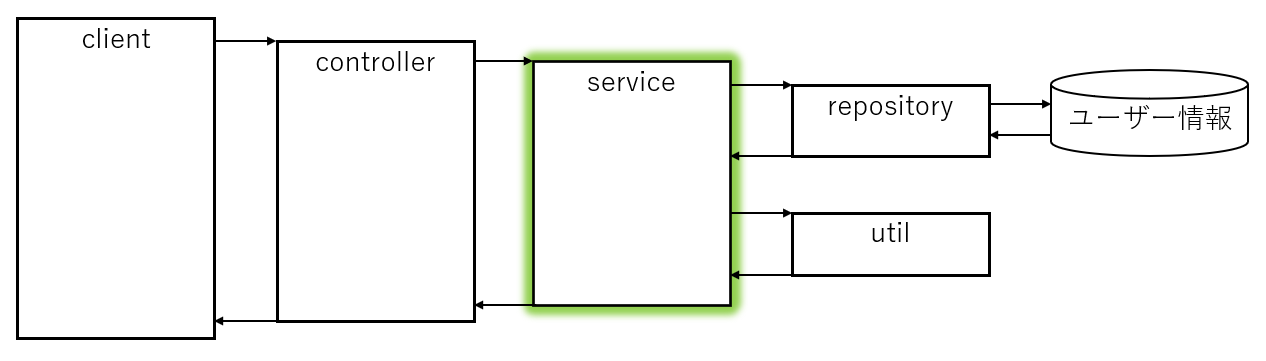
内部で repository, util のメソッドを呼び出すメソッド。 こちらも Spring Boot は関係なく、 Mockito の知識だけでテストを行える。
#実装
package dev.mikoto2000.springboot.workshop.service;

import org.springframework.stereotype.Service;

import dev.mikoto2000.springboot.workshop.repository.UserMapper;
import dev.mikoto2000.springboot.workshop.util.DateTimeUtil;
import dev.mikoto2000.springboot.workshop.util.UserUtil;
import lombok.RequiredArgsConstructor;

/**
 * UserService
 */
@RequiredArgsConstructor
@Service
public class UserService {

  private final DateTimeUtil dateTimeUtil;

  private final UserMapper userMapper;

  /**
   * 指定した usreId のユーザーの年齢を返却する。
   *
   * @param userId ユーザー ID
   * @return ユーザーの年齢
   */
  public Integer getAge(Long userId) {

    // ユーザーの取得
    var userOpt = userMapper.findById(userId);
    if (userOpt.isEmpty()) {
      throw new RuntimeException(String.format("対象ユーザーが見つかりませんでした(userId: %d)", userId));
    }
    var user = userOpt.get();

    // 本日の日付の取得
    // 単体テスト時に楽に DI できるように
    // 直接 LocalDate.now() を使わないようにする
    var today = dateTimeUtil.now();

    // 誕生日の取得
    // 本当は User クラスにあるべきだけど
    // 説明の簡単化のため UserUtil クラスに実装している
    var birthday = UserUtil.getAge(user.getBirthday(), today);

    return birthday;
  }
}#テスト
package dev.mikoto2000.springboot.workshop.service;

import static org.junit.jupiter.api.Assertions.*;
import static org.mockito.Mockito.*;

import java.time.LocalDate;
import java.util.Optional;

import org.junit.jupiter.api.AfterEach;
import org.junit.jupiter.api.BeforeEach;
import org.junit.jupiter.api.Test;
import org.junit.jupiter.api.extension.ExtendWith;
import org.mockito.Mock;
import org.mockito.junit.jupiter.MockitoExtension;

import dev.mikoto2000.springboot.workshop.bean.User;
import dev.mikoto2000.springboot.workshop.repository.UserMapper;
import dev.mikoto2000.springboot.workshop.util.DateTimeUtil;

/**
 * UserServiceTest
 */
@ExtendWith(MockitoExtension.class)
public class UserServiceTest {

  @Mock
  // モックする対象
  private DateTimeUtil dateTimeUtil;

  @Mock
  // モックする対象
  private UserMapper mapper;

  // テスト対象
  private UserService service;

  @Test
  public void testGetAge() {
    // 以下 ①, ② でモックの返却値を設定

    // 現在時刻を 2025/1/1 だとする ①
    when(dateTimeUtil.now())
      .thenReturn(LocalDate.of(2025, 1, 1));

    // ユーザー ID 1 のユーザーが 25 歳の場合 ②
    when(mapper.findById(1L))
      .thenReturn(Optional.of(new User(1L, "mikoto2000", LocalDate.of(2000, 1, 1))));

    // メソッドを呼び出して戻り値を確認。
    // ③ の呼び出し時に、 ①, ② で設定したモックが利用される。

    // 実行結果の取得 ③
    Integer actual = service.getAge(1L);

    // 想定と実行結果の比較
    assertEquals(25, actual);
  }

  // テストメソッド実行前に毎回呼ばれる処理
  @BeforeEach
  public void setup() {
    service = new UserService(dateTimeUtil, mapper);
  }

  // テストメソッド実行後に毎回呼ばれる処理
  @AfterEach
  public void tearDown() {
    reset(mapper);
  }
}#Repository のテスト
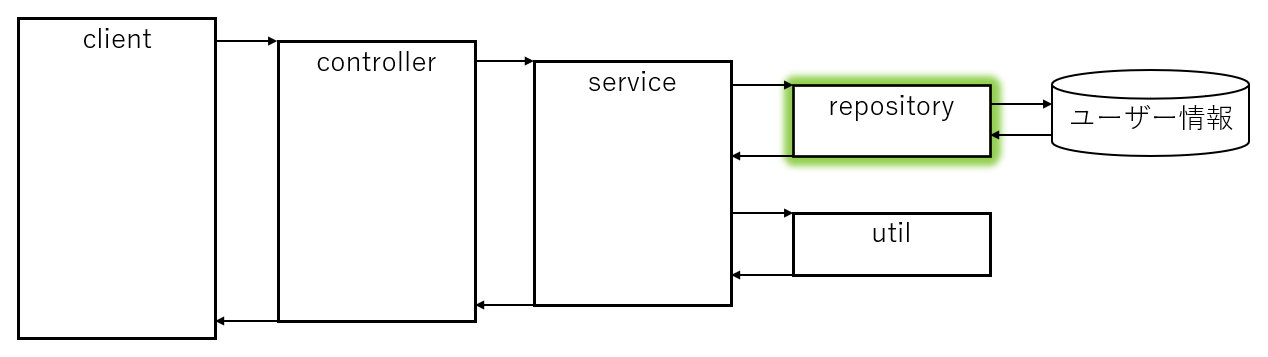
実際に DB に接続するメソッドのテスト。 今回は本物の DB を使用しテストを行う方法を説明。
#実装
package dev.mikoto2000.springboot.workshop.repository;

import java.util.Optional;

import org.apache.ibatis.annotations.Mapper;
import org.apache.ibatis.annotations.Select;

import dev.mikoto2000.springboot.workshop.bean.User;

/**
 * UserMapper
 */
@Mapper
public interface UserMapper {

  /**
   * 対象 userId のユーザーを取得する。
   */
  @Select("""
          select
            *
          from
            "user"
          where
            id = #{userId}
          """)
  Optional<User> findById(Long userId);
}#テスト
package dev.mikoto2000.springboot.workshop.repository;

import static org.junit.jupiter.api.Assertions.*;

import java.time.LocalDate;
import java.util.Optional;

import org.junit.jupiter.api.Test;
import org.mybatis.spring.boot.test.autoconfigure.MybatisTest;
import org.springframework.beans.factory.annotation.Autowired;
import org.springframework.test.context.jdbc.Sql;
import org.springframework.transaction.annotation.Transactional;

import dev.mikoto2000.springboot.workshop.bean.User;

/**
 * UserMapperTest
 */
// MyBatis Starter が提供している MyBatis テスト用のアノテーションを設定
// JPA の場合は @DataJpaTest を使用する
@MybatisTest
public class UserMapperTest {

  @Autowired
  private UserMapper mapper;

  @Test
  // @Sql アノテーションで、テストデータ初期化用 SQL を指定
  // この例の場合、 `resources/sql/UserMapperTest-findById.sql` の SQL が実行される
  @Sql("/sql/UserMapperTest-findById.sql")
  // @Transactional を指定することで、テストメソッド実行後 DB がロールバックされる
  @Transactional
  // あとは基本のテストと同じようにメソッドを呼び出して戻り値を確認すればOK.
  public void testFindById() {
    Optional<User> userOpt = mapper.findById(1L);

    assertTrue(userOpt.isPresent());

    User user = userOpt.get();

    assertEquals(user.getId(), 1L);
    assertEquals(user.getName(), "mikoto2000");
    assertEquals(user.getBirthday(), LocalDate.of(2000, 1, 1));
  }
}#Controller のテスト
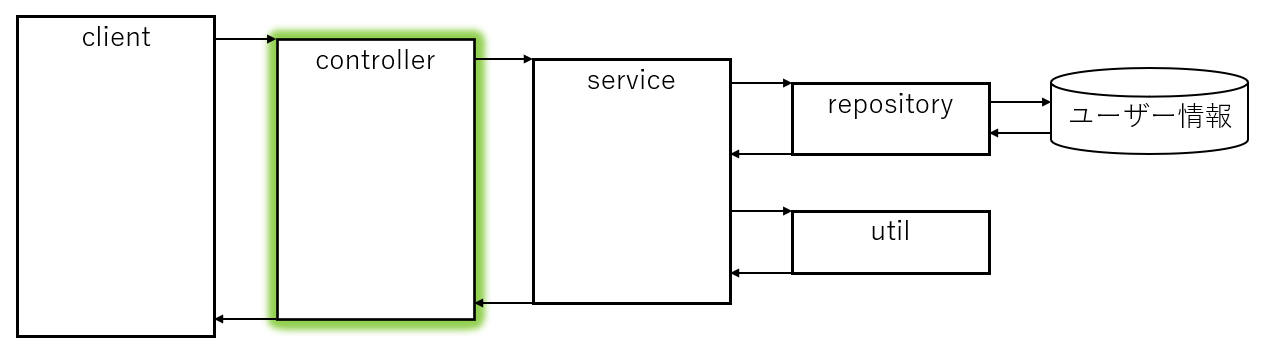
サービスを呼び出すメソッドのテスト。 controller のテストでは、MockMvc を利用して Web リクエストをエミュレートする。
#実装
package dev.mikoto2000.springboot.workshop.controller;

import org.springframework.web.bind.annotation.GetMapping;
import org.springframework.web.bind.annotation.PathVariable;
import org.springframework.web.bind.annotation.RestController;

import dev.mikoto2000.springboot.workshop.service.UserService;
import lombok.RequiredArgsConstructor;

/**
 * UserController
 */
@RestController
@RequiredArgsConstructor
public class UserController {

  private final UserService service;

  /**
   * 指定した usreId のユーザーの年齢を返却する。
   *
   * @param userId ユーザー ID
   * @return ユーザーの年齢
   */
  @GetMapping("/users/{userId}/age")
  public Integer getAge(
      @PathVariable Long userId
      ) {
    return service.getAge(userId);
  }
}#テスト
package dev.mikoto2000.springboot.workshop.controller;

import static org.springframework.test.web.servlet.request.MockMvcRequestBuilders.*;
import static org.springframework.test.web.servlet.result.MockMvcResultMatchers.*;

import static org.junit.jupiter.api.Assertions.*;
import static org.mockito.Mockito.*;

import org.junit.jupiter.api.Test;
import org.springframework.beans.factory.annotation.Autowired;
import org.springframework.boot.test.autoconfigure.web.servlet.WebMvcTest;
import org.springframework.test.context.bean.override.mockito.MockitoBean;
import org.springframework.test.web.servlet.MockMvc;

import dev.mikoto2000.springboot.workshop.service.UserService;

/**
 * UserControllerTest
 */
@WebMvcTest(UserController.class)
public class UserControllerTest {

  @Autowired
  private MockMvc mockMvc;

  @MockitoBean
  private UserService service;

  @Test
  public void ユーザーの年齢を取得する() throws Exception {
    // ユーザー ID 1 のユーザーが 25 歳だったとする
    when(service.getAge(1L)).thenReturn(25);

    // controller 呼び出しと値の確認
    // MockMvc を用いて Web リクエストをエミューレートする
    mockMvc.perform(get("/users/1/age"))
      .andExpect(status().isOk())
      .andExpect(content().string("25"));
  }
}#まとめ
以下のテストに必要なアノテーションやアサーションについて説明しました。
- Util のテスト(普通の Java のテスト)
- Service のテスト
- Repositoryのテスト
- Controller のテスト
後はこれの応用なので、自信をもってテストを書いていきましょう。